







Printing via USB flash memory (SELPHY CP810)
Solution
Just like images on memory cards, images on commercially available USB flash memory can also be printed.
NOTE
- Please use a commercially available USB flash memory.
- Depending on the brand of USB flash memory used, it may be difficult to insert or remove, and it may not operate properly.
- Refer to the user guide included with your USB flash memory for operating instructions.
- Depending on the images edited on the computer or the image size selected during shooting, images may not be displayed or printed correctly.
REFERENCE
- The USB memory file format supported by this printer is FAT/exFAT.
- JPEG images conforming to the Exif standard can be printed with the printer. (JPEG images whose pixel count is 8000 x 8000 or fewer pixels)
1.  Turn on the printer and
  insert the USB flash memory.
Turn on the printer and insert the USB flash memory.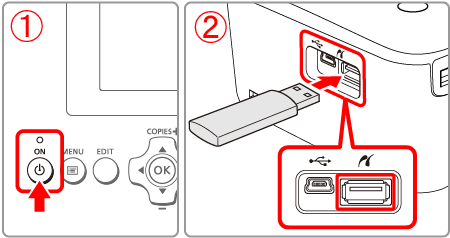
2. The following screen appears on the printer's [LCD monitor].
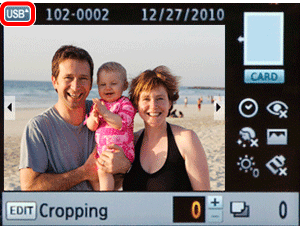
All further steps are the same as those used for printing images from memory cards.