To check the version of the Windows Vista you are using (32 bit or 64 bit), follow the procedure below.
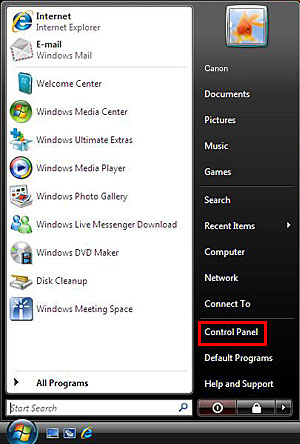
1. Click [Control Panel] from the [Start] menu.
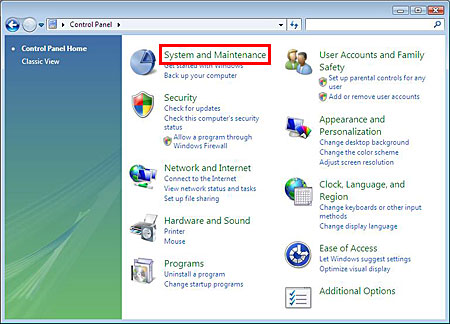
2. Click [System and Maintenance].
REFERENCE
In Classic view, click [System].
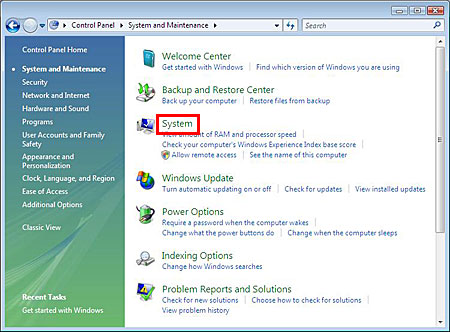
3. Click [System].
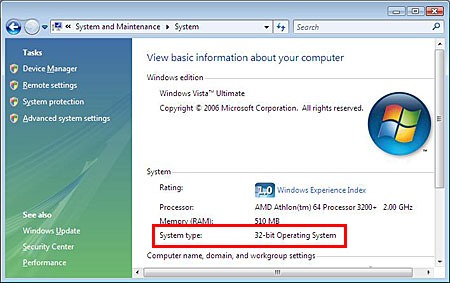
4. The basic information about your computer is displayed. Check the version shown in [System type].
Check My Booking
Provide your booking code and email address you used for the registration, we will re-send the confirmation email to you.
You’re being redirected to Canon Asia website for Medical & Industrial product information.
By continuing to use this website, you are agreeing to our Term of Use and Privacy Policy (including the use of cookies by this site to offer you a better experience).