





Paper Handling
Solution
Available paper/document type and size are explained below.
Available document type, size, weight and quantity are shown in the table below.
| Platen Glass | ADF | |
| Type | Plain paper Thick documents Photographs Small documents (e.g., index cards) Special types of paper (e.g., tracing paper*1, transparencies*1, etc.) Book (Height: 24 mm maximum) | Plain paper (Multi-page documents of the same size, thickness and weight or one-page documents.) |
| Size (W x L) | 216 mm x 297 mm maximum | 216 x 356 mm maximum 105 x 148.5 mm minimum |
| Weight | 2 kg maximum | 40 to 105 g/sq.m. maximum |
| Quantity | 1 sheet | 35 sheets*2 maximum (For LGL documents 10 sheets maximum)*2 |
*1 When copying transparent documents such as tracing paper or transparencies, use a piece of plain white paper to cover the document after placing it face-down on the platen glass.
*2 80 g/sq.m. paper
- Do not place the document on the platen glass or in the ADF until the glue, ink or correction fluid on the document is completely dry.
- To prevent documents jamming in the ADF, do not use any of the following:
- Wrinkled or creased paper
- Carbon paper or carbon-backed paper
- Curled or rolled paper
- Coated paper
- Torn paper
- Onion skin or thin paper
- Documents with staples or paper clips attached
- Paper printed with a thermal transfer printer
- Transparencies
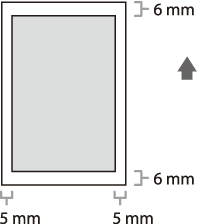
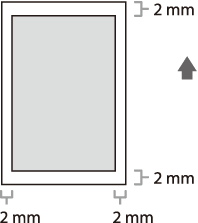
Make sure your document's text and graphics fall within the shaded area in the following diagram. Note that the margin widths listed are approximate and there may be slight variations in actual use.
| Paper cassette/Multi-purpose tray | |
| Size (W x H) | A4, B5, A5, Executive, Envelope (COM10, Monarch, DL, ISO-C5 (162 x 229 mm), Oficio, Brazil-Oficio, Mexico-Oficio, Government-LTR, Government-LGL, Foolscap, LTR, LGL, 76 x127 to 216 x 356 mm |
| Weight | 60 to 163 g/sq.m. |
| Quantity | Paper cassette: Maximum 250 sheets (Height: maximum 25mm)
Multi-purpose tray: Maximum 1 sheet |
| Type | Plain Paper, Plain Paper L, Heavy Paper, Heavy Paper H, Transparency |
NOTE
The default paper size is A4. If you use a different paper size, you need to change the paper size settings.
- To prevent paper jams, do not use any of the following:
- Wrinkled or creased paper
- Curled or rolled paper
- Coated paper
- Torn paper
- Damp paper
- Very thin paper
- Paper which has been printed on using a thermal transfer printer (Do not copy on the reverse side.)
- The following types of paper do not print well:
- Highly textured paper
- Very smooth paper
- Shiny paper
- Make sure the paper is free from dust, lint, and oil stains.
- Make sure to test paper before purchasing large quantities.
- Store all paper wrapped and on a flat surface until ready for use. Keep opened packs in their original packaging in a cool, dry location.
- Store paper at 18°C–24°C, 40%–60% relative humidity.
- Use only the transparencies designed for laser printers. Canon recommends you to use Canon type transparencies with this machine.
The shaded area indicates the approximate printable area of A4 paper and envelope. Note that the margin widths listed are approximate and there may be slight variations in actual use.