









Name of components and information displayed on the screen (PowerShot S110)
Solution
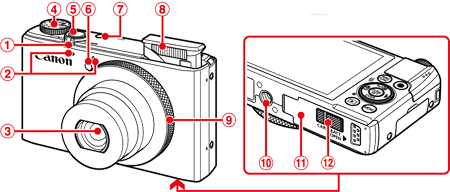
 | Zoom Lever Shooting:  (Telephoto) / (Telephoto) /  (Wide Angle) (Wide Angle)Playback:  (Magnify) / (Magnify) /  (Index) (Index) |  | Power button |
 | Microphone |  | Flash |
 | Lens |  | Control ring |
 | Mode dial |  | Tripod socket |
 | Shutter button |  | Memory card / battery cover |
 | Lamp |  | DC coupler terminal cover |
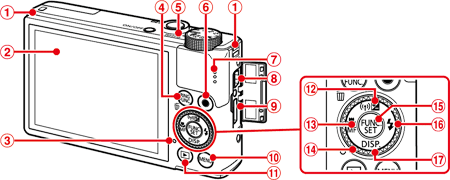
| Strap mount | |  button button |
| Screen (LCD monitor)* | |  (Playback) button (Playback) button |
| Indicator | |  (Exposure compensation) / (Exposure compensation) /  (Wireless LAN) / (Wireless LAN) /  button button |
|  (Ring function selector) / (Ring function selector) /  (Single image erase) button (Single image erase) button |  |  (Macro) / (Macro) /  (Manual focus) / (Manual focus) /  button button |
| Indicator |  | Control dial |
| Movie button |  |  FUNC./SET button FUNC./SET button |
| Speaker |  |  (Flash) / (Flash) /  button button |
| DIGITAL terminal |  |  (Display) / (Display) /  button button |
| HDMITMterminal |
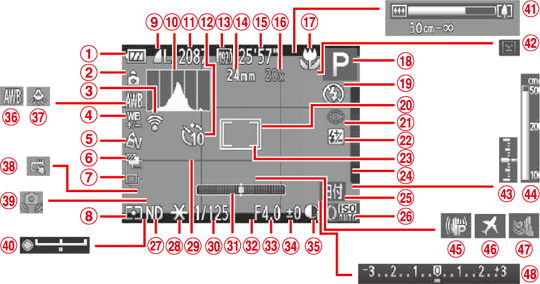
| Battery level |  | Date stamp |
| Camera orientation* |  | ISO speed |
| Eye-Fi connection status |  | ND filter |
| White balance correction |  | AE lock , FE lock |
| My Colors |  | Grid lines |
| AEB shooting / Focus bracketing |  | Shutter speed |
| Drive mode |  | Electronic level |
| Metering method |  | Aspect ratio |
| Compression (image quality) , Resolution , RAW |  | Aperture value |
| Histogram |  | Exposure compensation level |
| Recordable shots |  | i-Contrast |
| Self-timer |  | White balance |
| Movie quality |  | Mercury lamp correction |
| Focal length |  | Touch Shutter |
| Remaining time |  | Camera shake warning |
| Digital zoom magnification, Digital tele-converter |  | Exposure shift bar |
| Focusing range , IS mode icon |  | Zoom bar |
 | Shooting mode , Scene icon |  | Blink detection |
 | Flash mode |  | Exposure level |
 | AF frame |  | MF indicator |
 | Red-eye correction |  | Image stabilization |
 | Flash exposure compensation / Flash output level |  | Time zone |
 | Spot AE point frame |  | Wind filter |
 | Switching control ring functions |  | Exposure compensation bar |
*  : Regular orientation ,
  : Held vertically
: Regular orientation , : Held verticallyThe camera detects the shooting orientation and adjusts settings for optimal shots.
Orientation is also detected during playback, and in either orientation, the camera automatically rotates images as needed.
However, the orientation may not be detected correctly when the camera is pointed straight up or down.
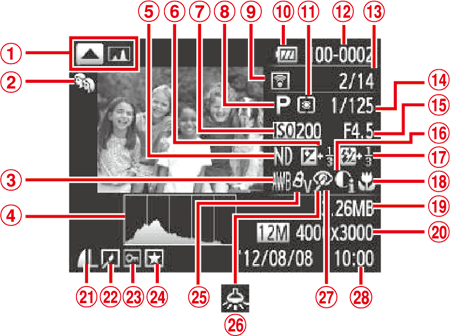
| Switch display: RGB histogram , GPS information | | Aperture value |
| My Category | | i-Contrast |
| White balance / White balance correction | | Flash , Flash exposure compensation |
| Histogram | | Focusing range |
| ND filter | | File size |
| Exposure compensation level , Exposure shift level | | Still images : Resolution Movies: Movie length |
| ISO speed , Playback speed | | Compression (image quality) / Resolution , RAW , MOV(movies) |
| Shooting mode | | Group playback , Image editing |
| Transferred via Eye-Fi | | Protection |
| Battery level | | Favorites |
| Metering method | | My Colors |
| Folder number - File number | | Mercury lamp correction |
| Current image no. / Total no. of images | | Red-eye correction |
| Shutter speed (still images) , Image quality / Frame rate (movies) | | Shooting date / time |