









Creative Auto <CA> Shooting (EOS REBEL T5/EOS 1200D)
Solution
The method for shooting in <CA> Creative Auto mode is explained below.
In the <  > mode, you can easily change the depth of field, drive/self-timer, and flash firing. You can also choose the ambience you want to convey in your images. The default settings are the same as the <
  > mode.
> mode, you can easily change the depth of field, drive/self-timer, and flash firing. You can also choose the ambience you want to convey in your images. The default settings are the same as the < > mode.* CA stands for Creative Auto.
1. Set the camera's power switch to <ON>.
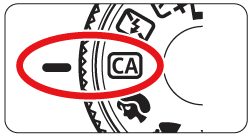
2. Set the Mode Dial to <>.
>.
3. Press the < > button to display the Quick Control screen.
> button to display the Quick Control screen.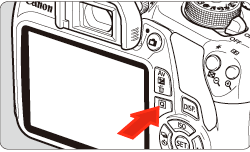
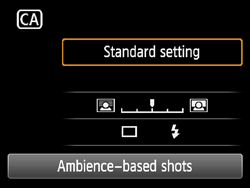
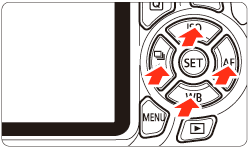
4. Press the < > key to select a function.
> key to select a function.The selected function and Feature guide will appear.
5. Press the shutter button halfway to autofocus.
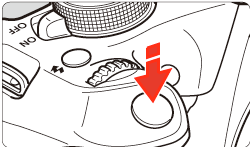
-The dot inside the AF point achieving focus flashes briefly in red. At the same time, the beeper will sound and the focus confirmation light [
  ] in the viewfinder will light up.
focus confirmation light [ ] in the viewfinder will light up.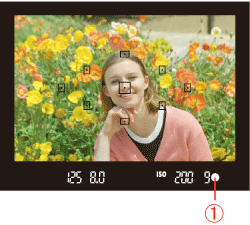
6. Take the picture.
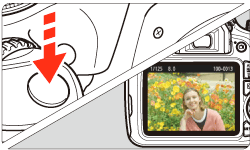
Press the shutter button completely to take the picture.
-The captured image will be displayed for 2 sec. on the LCD monitor.
-After taking the picture, retract the built-in flash by pushing it down with your fingers.
Pressing the <> button enables you to set the following:
> button enables you to set the following: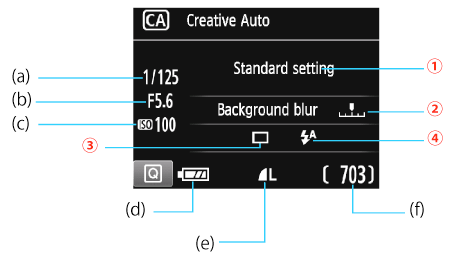
(a): Shutter speed
(b): Aperture
(c): ISO speed
(d): Battery check
(e): Image-recording quality
(f): Possible shots
 Ambience-based shots
You can choose the ambience you want to convey in your images. Press the < > keys or turn the <
 > dial to select the desired ambience. You can also select it from a list by pressing <SET>.
> keys or turn the <> dial to select the desired ambience. You can also select it from a list by pressing <SET>. Blurring/sharpening the background
If you move the index mark toward the left, the background will look more blurred. If you move it toward the right, the background will look more in focus. Press the <> key or turn the <> dial to select the desired ambience. Depending on the lens and shooting conditions, the background may not look so blurred. This function cannot be set (grayed out) while the built-in flash is raised in the < ><
>< > mode. If flash is used, this setting will not be applied.
> key or turn the <> dial to select the desired ambience. Depending on the lens and shooting conditions, the background may not look so blurred. This function cannot be set (grayed out) while the built-in flash is raised in the <><> mode. If flash is used, this setting will not be applied. Drive/self-timer: Press <SET> and set it with the < > keys or the < > dial.
[  ] Single shooting: Shoot one image at a time.
] Single shooting: Shoot one image at a time.[  ] Continuous shooting: While you hold down the shutter button completely, shots will be taken continuously. You can shoot up to approx. 3 shots per sec.
] Continuous shooting: While you hold down the shutter button completely, shots will be taken continuously. You can shoot up to approx. 3 shots per sec.[  ] Self-timer: 10sec./remote: The picture is taken 10 seconds after you press the shutter button. A remote controller can also be used.
] Self-timer: 10sec./remote: The picture is taken 10 seconds after you press the shutter button. A remote controller can also be used.[  ] Self-timer: Continuous: Press the <
 > key to set the number of multiple shots (2 to 10) to be taken with the self-timer. 10 seconds after you press the shutter button, the set number of multiple shots will be taken.
] Self-timer: Continuous: Press the <> key to set the number of multiple shots (2 to 10) to be taken with the self-timer. 10 seconds after you press the shutter button, the set number of multiple shots will be taken. Flash firing: Press <SET> and set it with the <> keys or the <> dial.
[ ] Auto flash: The flash fires automatically when necessary.
] Auto flash: The flash fires automatically when necessary.[ ] Flash on: The flash fires at all times.
] Flash on: The flash fires at all times.[  ] Flash off : The flash is disabled.
] Flash off : The flash is disabled.CAUTION
If you use an external Speedlite, [Flash firing] cannot be set.